What we can see. (Not much.)
Most period apps ask you to trust a policy. We’d rather show you the plumbing: what lives on your phone, what our server holds, and what it can’t read.
Can Splash see my period data?
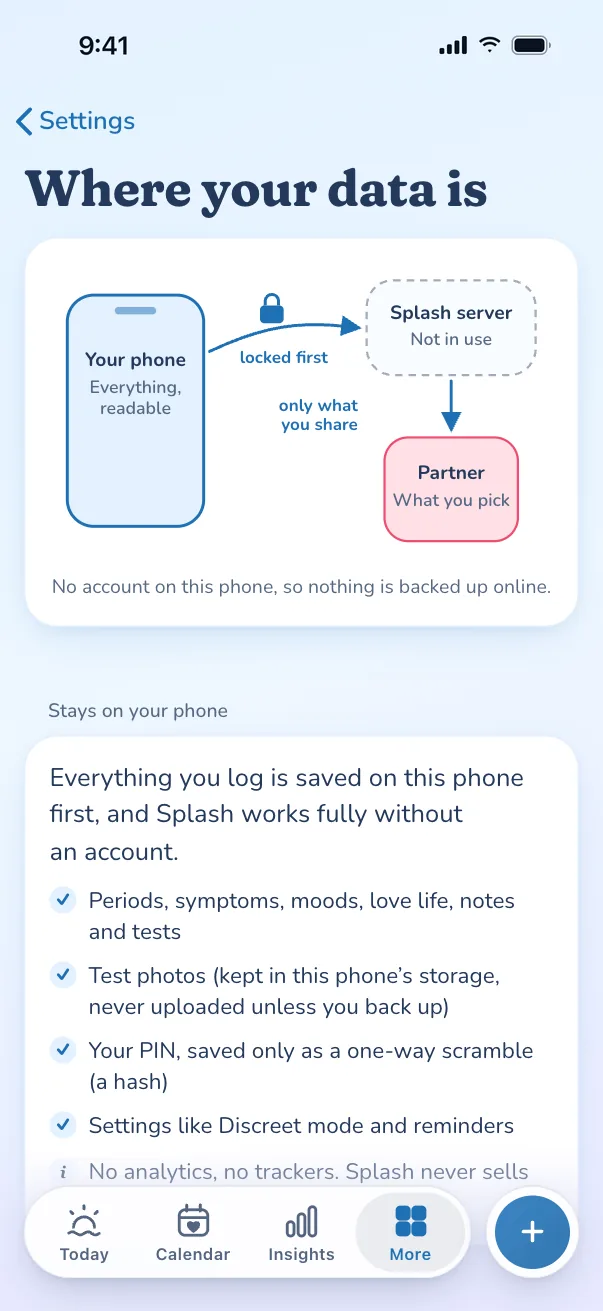
- Without an account, no. Everything you log is saved on your phone, and nothing about your cycle reaches us.
- With an account, still no. Your phone locks your data with AES-GCM-256 before it leaves. We store a locked copy and don’t have the key.
- We can see your email, when you sync, and the text of notifications we send for you. That list is below, in full.
Last updated
Where your data goes, and who can read it.
Green is yours alone. Amber is what our server can read. Grey is what nobody gets.
- Only you
- We can see this
- Nobody
Your phone
Only you
- Periods, symptoms, moods
- Love life, notes, tests
- Test photos
- PIN (a one-way hash only)
- Vault key and share keys
No account? Nothing about your cycle reaches us.
Our server
Supabase, Paris (EU)
A locked copy (ciphertext). We have no key.
We can see:
- Your account email
- When you sync, and how big the copy is
- Which categories a share includes (not the data)
- Push notification addresses
- Notification text and send time (neutral by default)
People you share with
Only if you share
- Only the categories you tick for each person: cycle, fertile days, mood, symptoms, love, notes, pregnancy, vibe
- PIN, photos, anything you didn’t tick
Unlocked on their phone with the key in your QR code. Never your PIN, photos, or anything you leave off.
Lock a log yourself. Then try to open it.
This is real end-to-end encryption, running right here in your browser with the same code the app uses.
What you log (only your phone sees this)
Needs JavaScript to run the demo.
Your key (stays in your hand)
What our server stores
Press “Lock it” to make a locked copy.
This uses the same code as the Splash app: AES-GCM with a 256-bit key and a fresh random 12-byte IV, after the text is compressed. In the app the key never leaves your devices, except inside QR codes you choose to show. Refresh the page and this key is gone for good.
How to stay protected.
Five habits that keep your cycle yours, on the phone and off it.
Lock Splash with Face ID, Touch ID or a PIN.
Encryption guards the copy on our server. On the phone itself, Face ID or Touch ID, a backup PIN and a decoy PIN keep Splash closed to anyone holding it. Phone safety.
Keep your recovery code somewhere safe.
Only you hold the key, so the code is how you get back in on a new phone. A password manager or a printed copy both work, or save a backup file.
Back up now and then.
Phones sometimes tidy up website data. An account backup or a saved file means a tidy-up never costs you your history.
Keep reminders neutral.
Reminders wait on our server until they’re sent, so they say “Reminder” by default. Keep that wording, or turn push off, and the timing is all anyone could see.
Know exactly what we hold.
If we were ever legally compelled, this is the full list: your account email and sign-up date; the locked copy of your data (ciphertext we can’t read) and when it synced, with its size; which categories a partner share includes (not the data itself); push notification addresses, and notification text and send times (neutral by default); our host’s short-lived request logs: IP address, device type and time. Never your logs in readable form.
The small print, in big print
We don’t sell or share your data
Splash has no third-party analytics SDKs and no trackers. We don’t sell data, and we couldn’t sell your logs if we wanted to: we can’t read them.
This website sets no cookies
No cookies, no local storage, no analytics, no third-party scripts or fonts. Read the cookie-free statement.
Who we rely on
The app is hosted on Vercel. Accounts, locked backups and notifications run on Supabase in Paris, France (EU, eu-west-3), so they stay in the EU/EEA. Two optional extras reach other companies, and neither ever carries your health data:
- Emoji images. Splash ships most emoji pictures itself. For rarer ones, it loads the picture from Google’s Noto emoji service, which means Google sees a request from your device.
- Natural read-aloud voice. If you turn on the natural voice in the library, the app downloads a voice model from Hugging Face once. After that, reading aloud runs on your phone.
Delete everything
Without an account, deleting the app (or clearing its data) deletes everything. With an account, Settings → Account & sync → Delete account removes your account and every row we hold about you, at once.
Want the legal version? Read the privacy policy. Want the maths? Read security.
Keep your cycle on your phone.
Free to use. No account, no subscription.
Last updated 28 October. Every change, including anything that touches your privacy, is in the public changelog.